
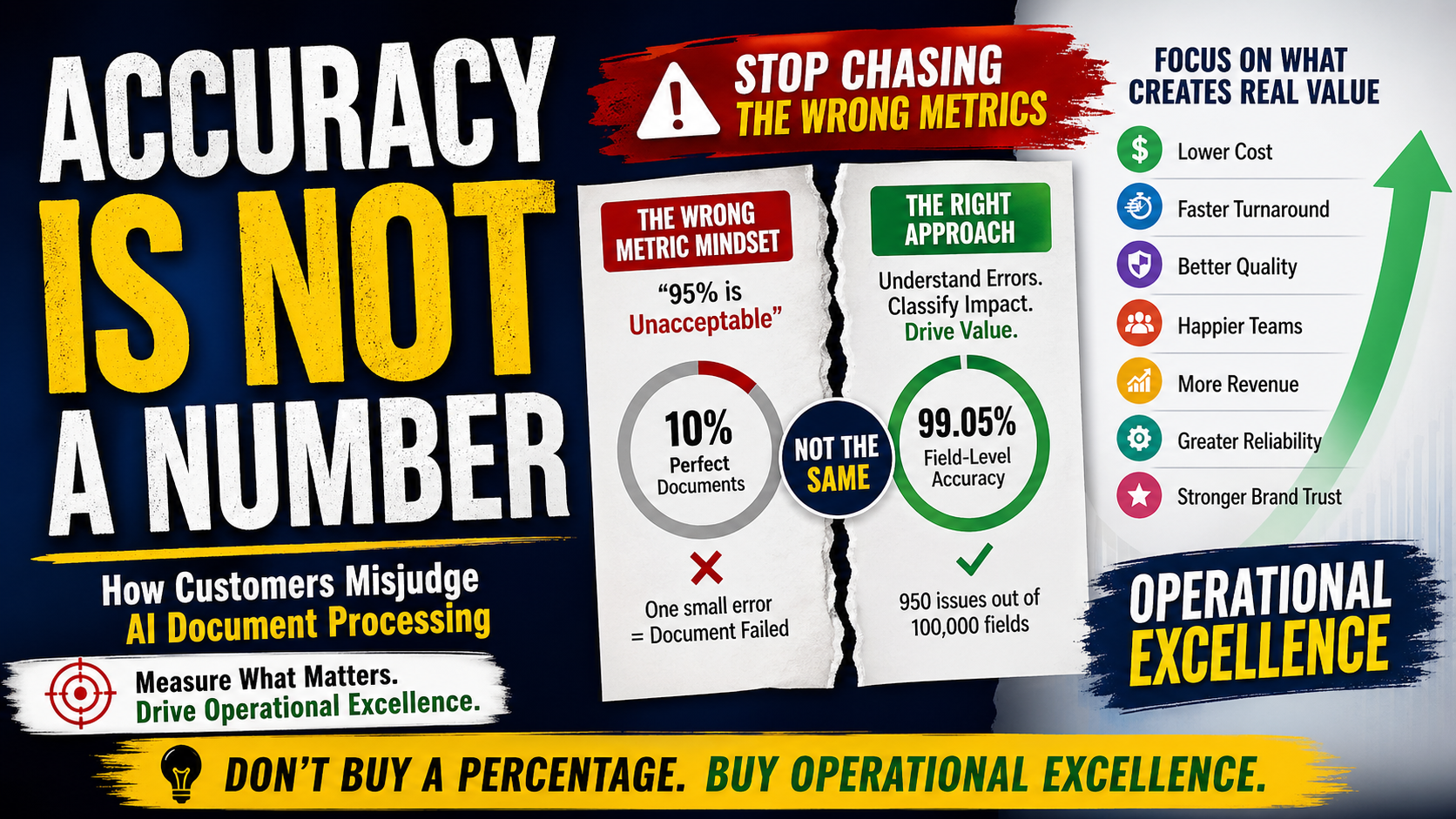
Accuracy Is Not a Number#
How Customers Misjudge AI Document Processing
Many enterprise AI projects struggle not because the technology is weak, but because success is measured incorrectly.
A customer asks:
“What is your accuracy?”
The vendor replies:
“95%.”
The customer says:
“95% is unacceptable.”
The discussion ends.
Everyone feels logical. Yet everyone may be mistaken.
This happens every day in document AI, OCR, invoice automation, KYC onboarding, claims processing, contract extraction, brokerage statements, tax forms, financial reporting, logistics paperwork, and many other workflows.
The root problem is simple:
Accuracy is not a single number.
It is a multi-dimensional operational concept. If measured badly, a useful system can be rejected. If measured wisely, an imperfect system can create enormous value.
Why the Word “Accuracy” Causes Confusion#
When people say “accuracy,” they often mean very different things:
- Field-level accuracy
- Document-level perfect match rate
- OCR character accuracy
- Page classification accuracy
- Table row accuracy
- Straight-through processing rate
- Reviewer correction rate
- Critical-field correctness
- Turnaround-time improvement
- Business outcome success
Using one word for all of these creates confusion.
It is like asking:
“How healthy are you?”
Without specifying whether we mean blood pressure, stamina, sleep, mobility, or mental well-being.
A Real Example: 1000 Documents#
Suppose a system processes:
- 1000 documents
- 100 fields per document
That means:
100,000 field extraction opportunities
Now assume:
- 800 documents have one field error
- 50 documents have two field errors
- 50 documents have cosmetic punctuation or formatting issues
Total issues ≈ 950
So field-level success is roughly:
99.05%
But if someone says:
“Any document with even one issue is failed.”
Then perfect-document accuracy may look very low.
Same system. Two interpretations.
One says excellent. One says failure.
Neither metric alone tells the full truth.
The Perfect Document Trap#
Complex documents contain many fields.
Even when each field is highly accurate, the probability that every field is perfect naturally drops as field count rises.
So large schemas are unfairly punished by “all-or-nothing” document scoring.
A 150-field document should not be judged the same way as a 5-field form.
Many organizations reject strong systems simply because they use a mathematically harsh metric.
All Errors Are Not Equal#
One of the most common mistakes is treating every error the same.
These are not equal:
- Missing comma
- Wrong capitalization
- Date format mismatch
- Missing middle initial
- Wrong bank account number
- Wrong investor mapping
- Wrong NAV amount
- Missing transaction row
- Duplicate payment row
Yet many scorecards count them equally.
That is not quality management. That is scorekeeping without judgment.
Type I and Type II errors in document AI (BFSI)#
Type I and Type II depend on what you are measuring: page routing, filled fields vs the PDF, or checker vs reference file. Say that first; then the labels stay clear.
Three field outcomes vs ground truth (read this first)#
People often mix three cases. They are not the same:
- Complete miss – the field is empty, but the document (or the agreed reference) has a value. The extractor or LLM did not return the field at all. In the usual field sense this is Type II: you failed to capture what was there.
- Wrong or invented – the field is full, but the value is wrong vs the PDF (wrong amount, wrong name, wrong sign), or not on the page at all (hallucination). In the usual field sense this is Type I: you shipped bad trusted data.
- Almost match – the answer is right in meaning but not the same string: extra or missing comma or dot, spaces, case, or number format (
1,000vs1000). Not a miss. Not hallucination. Fix compare rules and normalization, not the model score alone.
What to call (3): a formatting mismatch or normalization gap—same meaning as the PDF, different characters until you apply the same cleanup rules to both sides (comma, dot, case, spaces, number style). After that step, many (3) cases become an exact match: then there is no defect, so no Type I, no Type II, and nothing to grade for severity on that field. If the checker still marks fail after that step, call it a checker false alarm. If strings still differ after normalization, stop calling it (3)—treat it as a real disagreement (usually (2) / Type I vs the PDF, or bad reference data). Reserve Type II for (1) and Type I for (2) when you score extractor vs document.
Type I and Type II vs severity—there is no Type III#
Type I and Type II are only two labels from one binary test you pick (for example “extractor output matches PDF after rules: yes/no,” or “checker: pass/fail”). They describe which way that test failed—not every kind of issue in the stack.
Severity (critical, major, minor, cosmetic—see the next section of this article) is a different question: “If we count this as a defect, how much harm?” You attach severity only after your rules say a defect exists—for example a wrong payment amount (Type I) is often critical; an empty required field (Type II) is often critical or major.
There is no Type III. A formatting gap (2) is handled by normalization + compare rules in the validator. The validator does not “guess” a third type: you define steps (trim spaces, case fold, decimal format, date map, alias lists where needed, and so on), then run equality. Match → no error row. Still different → not (2) anymore; score it as a real miss or wrong value, then severity applies if you log it.
Severity can still label minor formatting issues only if your process chooses to count some pre-normalization diffs as defects (for example for analyst dashboards). That is a policy choice, not a new statistical error type.
1. Page routing: Holding or not#
The system labels a page Holding or not Holding before it runs a holdings extractor (often an LLM).
Positive = “send this page to holdings extraction.”
- Type I: marked Holding, page is not → you run an expensive step for little gain (wasted tokens and time). Usually a smaller loss than the next line.
- Type II: marked not Holding, page is holdings → that step never runs; you drop the whole sheet. Usually the bigger loss.
Teams often raise recall on “Holding” first, then cut false “Holding” labels if cost hurts.
2. Field extraction vs the PDF#
Positive = “the filled value matches the PDF for this field.”
- Type I: filled value is wrong vs the PDF, or made up (hallucination). Downstream may still trust it.
- Type II: the PDF shows the value; the field is blank or the line was skipped (complete miss).
Vendor name – PDF has Acme Bank NA, reference file has ACME BANK, N.A. That is almost match (2). If the checker marks fail, that is a false alarm on the checker side, not proof the LLM invented a name.
+ vs - for debit/credit – both sides returned a symbol, so it is not the empty-field case (1). Use the PDF: if the PDF shows one direction and the field shows the other, that is wrong value (3) = Type I. If the PDF agrees with the model but the reference file disagrees, fix reference data or row matching before you blame the model.
3. Reference file, formatting, and the checker#
Dates, flags, and names differ across labelers, customer files, and exports. Plain string compare turns many almost matches (2) into fake “errors.”
Split extractor from checker:
- Extractor OK, checker too strict → false fail (noise, rework).
- Extractor wrong or empty, checker still pass → silent bad data (often worse).
4. Wrong ground truth from people#
Humans build the reference files, key-value tables, and labeled spans. Those labels are often wrong: typo, wrong row joined to the scan, stale export, tired misread of the PDF, two labelers using different rules, or a “fix” in Excel that never matched the legal document.
If you treat bad gold as always true, you scold a good extractor or praise a bad one. Type I and Type II scores become fiction.
How to handle it
- Boss rule: for disputes, the signed PDF or scan (or the contract image) wins over the spreadsheet unless legal says otherwise. When model and gold disagree, open the image first, then decide who was wrong.
- Log a separate bucket: e.g. “gold error” or “reference defect”—not the same row as model Type I until the PDF check clears it. That keeps dashboards honest.
- Correct the file, not only the metric: version your gold, record who changed what and when, and re-run scores after the fix. Otherwise the same wrong cell keeps poisoning regression tests and fine-tuning data.
- Stop bad labels at the door: spot-audits on new labels, two eyes on critical fields (amounts, IDs, parties), and disagreement rules when model confidence is high but gold says fail.
- Training data: wrong labels in the training set teach the wrong pattern. Sample-check gold the same way you sample-check model output.
The expensive trap: tuning models, prompts, thresholds, and OCR while the gold is wrong is one of the most wasteful and dangerous loops in document AI. Whole teams burn weeks “fixing” the system against a spreadsheet that was never true. Culturally, it is hard to doubt the reference file—someone signed it off, it sits in the repository everyone trusts, it feels official—so people skip opening the PDF or source file. That habit is exactly how bad gold survives and how good extractors get broken. This is why the rest of this article keeps saying normalize, match rows correctly, and open the PDF first when you judge errors.
When wrong fills hurt most#
Wrong payment details, amounts, IDs, or positions that posting or compliance trusts—especially when the checker still passes them.
When misses hurt most#
Empty must-have fields, missing AML facts, missing rows, or a holdings page never extracted because it was labeled not Holding.
Metrics in one line#
Precision targets wrong or invented fills (Type I). Recall targets complete misses (Type II). Normalization keeps almost matches (2) out of both scores. Page labels like Holding use the same precision/recall idea.
Severity does not replace Type I/II and is not a “Type III.” It ranks harm once your rules say a real defect exists (Type I, Type II, or a checker mistake you care about). The section above names which shape of mistake you are fixing at each step.
Build an Error Taxonomy Instead#
A mature organization classifies errors by severity.
Critical Errors#
Financial loss, wrong payment, compliance breach, wrong customer mapping, regulatory risk.
Major Errors#
Require reviewer correction, delay processing, break downstream workflow.
Minor Errors#
Formatting mismatch, label inconsistency, non-critical text variation.
Cosmetic Errors#
Spacing, commas, punctuation, capitalization.
Once errors are categorized, conversations become rational.
Human Accuracy Is Often Imaginary#
Many customers compare AI against an unrealistic idea of flawless human processing.
But real manual operations contain:
- Fatigue errors
- Copy-paste mistakes
- Missed fields
- Slow turnaround
- Inconsistent interpretation
- Training differences
- Silent unnoticed mistakes
- Reviewer disagreements
- End-of-day quality decline
The fair comparison is not:
AI vs perfect human
The fair comparison is:
AI + human review vs current human-only process
That comparison often changes everything.
Why Tables Need Different Metrics#
For invoices, brokerage statements, holdings, ledgers, transactions, and schedules, field metrics alone are insufficient.
Rows matter.
Common Row-Level Failures#
- Row missed completely
- Duplicate row extracted
- Header read as data row
- Two rows merged
- One row split
- Wrong row ordering
- Values attached to wrong row
- Continuation row mishandled
Imagine quantity and price are correct—but linked to the wrong security row.
Field scores may look fine. Business output is wrong.
Better Table Metrics#
- Row recall
- Duplicate row rate
- False row rate
- Row alignment accuracy
- Key-column correctness
- Total reconciliation accuracy
Customers Should Buy Operational Excellence, Not a Percentage#
This is the real mindset shift.
Most customers ask:
“How accurate is the model?”
The better question is:
“Does this system improve my operation safely and measurably?”
AI is not the goal.
Operational excellence is the goal.
What Operational Excellence Looks Like#
Cost#
- Lower cost per document
- Less manual effort
- Reduced overtime
- Lower outsourcing dependency
Performance#
- Faster turnaround time
- Higher throughput
- Better SLA achievement
- Better peak-load handling
Quality#
- Fewer critical errors
- Lower rework
- Better consistency
Brand & Trust#
- Faster customer response
- Fewer service mistakes
- Better client experience
Revenue#
- Faster onboarding
- Higher volume capacity
- More business without proportional hiring
Reliability#
- Predictable queues
- Stable operations
- Better exception control
Human Comfort#
Often ignored, but very real:
- Less repetitive typing
- Lower fatigue
- Reduced stress
- More meaningful work
- Better morale
Why “95% Is Unacceptable” Is Usually Incomplete#
95% of what?
- 95% bank account extraction may be risky
- 95% cosmetic formatting may be excellent
- 95% straight-through processing may be world-class
- 95% field accuracy across millions of fields may create huge ROI
- 95% prefill assistance may transform reviewer productivity
Without context, the statement has little meaning.
Common Wrong Metrics Customers Use (and Why They Mislead)#
| # | Wrong / Incomplete Metric | Why It Misleads |
|---|---|---|
| 1 | Overall accuracy | Undefined: accuracy of what, at which layer? |
| 2 | Perfect-document rate only | One small issue fails a 150-field document; unfair to large schemas. |
| 3 | Exact string match only | Punishes harmless formatting; needs normalization, not more yelling at the model. |
| 4 | Equal weight per field or per error | A comma issue is not a wrong bank account; critical and trivial fields differ. |
| 5 | Field accuracy without row-level truth | Misses wrong row links, dropped rows, duplicate rows, and wrong entity attachment. |
| 6 | Page or doc-type label without extraction proof | Correct “Holding” or “Invoice” label does not mean values were read correctly. |
| 7 | OCR character score only | High character score can still produce wrong amounts, parties, or line items. |
| 8 | Demo or public benchmark as production truth | Curated demos and public sets are not your mailroom PDFs. |
| 9 | First-pass output only | Ignores validation, human review, rework, and what actually ships. |
| 10 | Ignoring confidence | Hard to route low-trust work and to separate “empty” from “unsure.” |
| 11 | Tracking only false positives or only false negatives | Wrong fills and misses both matter; different fields care about different sides. |
| 12 | Treating blank as always wrong | Often safer than a confident wrong value. |
| 13 | Same accuracy target for every doc type | Risk and layout complexity differ by form and channel. |
| 14 | No reconciliation or total checks | Field scores can look fine while totals and money still disagree. |
| 15 | Ignoring straight-through, review time, cost per corrected doc, or business outcome | A percentage on a slide is not throughput, margin, or risk reduced. |
A Better Evaluation Framework#
Use five layers.
Layer 1: Extraction Metrics#
- Precision
- Recall
- Normalized match
- Numeric tolerance match
Layer 2: Severity Metrics#
- Critical
- Major
- Minor
- Cosmetic
Layer 3: Document Metrics#
- Perfect-document rate
- Usable-document rate
- Review-required rate
Layer 4: Operational Metrics#
- Cost per doc
- Throughput
- Turnaround time
- Hours saved
Layer 5: Risk Metrics#
- Financial exposure
- Compliance leakage
- Customer impact
- Audit traceability
The Mature Enterprise Mindset#
Immature mindset:
AI made one mistake, therefore AI failed.
Mature mindset:
Every operational system has errors. Mature organizations measure, classify, reduce, route, and economically manage those errors.
This applies to:
- Humans
- AI systems
- OCR engines
- Rule engines
- Outsourcing vendors
- Shared service centers
Final Truth#
Many organizations reject a useful AI system because it is “not perfect,” while continuing a slower, costlier, more error-prone manual process whose defects remain invisible.
That is not operational discipline.
That is metric illusion.
Final Takeaway#
Enterprises do not run on model scores.
They run on operations.
So stop asking only:
“What is the accuracy?”
Start asking:
“How does this system improve cost, speed, quality, reliability, risk control, and human work life?”
That is the question that creates real value.

Comments: